
Answers to most commonly asked questions...
Frequently Asked Questions
Whether you’re creating a few asset labels or producing large runs for your business, we’ve made the process simple and flexible. From choosing the right designer tool to submitting artwork, reviewing proofs, and tracking your order, this guide explains each step clearly. You’ll learn about the Basic and Advanced Designer tools on our website, understand our printing processes, see how your label is proofed before printing, and find out about formats, payment options, and delivery.
Everything is designed to help you get high-quality, accurate labels with minimal hassle, whether this is your first order or you’re a valued returning customer.
Use the links below to browse
by FAQ Query
How do I buy labels from custom labels?
How do I navigate your site?
How do you use the two label designers?
When should I use the basic label designer?
When should I use the advanced label designer?
File upload & artwork requirements
What can I put in a QR code or barcode?
How should I produce and supply my variable data?
What information do you need about my label application?
Do you have any other label specifications?
How is my label proofed and approved before printing?
Can I track my order?
How do your qc checks differ from others?
How do I pay?
Returns, cancellations, and refunds
Support & contact
buying labels, the custom labels website
Buying labels from Custom Labels
No matter how you choose to order, our process is built for speed, accuracy, and transparency. After placing your order online or through our sales team, you’ll know exactly what to expect at each stage from confirmation and design approval to invoicing, production, and delivery.
Ordering Online
- Place Your Order – Pick your labels, size, quantity, design your label using our basic or advanced designer tools (see further details below), add to basket and fill out your details in checkout.
- Confirmation Email – We’ll send you an email with all the order details for peace of mind.
- Design Approval – To ensure your design, variable data, and codes are correct, our design team creates a scaled approval form for you to review and approve via the Signable system, which will be sent to you by email.
- Invoice & Production – Once approved, we’ll issue your final invoice and start production.
- Dispatch & Tracking – Your labels are on their way! We’ll email you DPD tracking so you can follow your delivery.
Ordering via Our Sales Team
- Talk to Us – Send us your enquiry and we’ll provide a quote.
- Design Approval – Our design team will prepare a scaled approval form for you, just like online orders.
- Invoice & Production – Approve the design, we issue your invoice, and production begins.
- Dispatch & Tracking – Receive an email with DPD tracking once your labels are dispatched.
However you choose to order, we make sure your labels are accurate, approved, and delivered efficiently.
How to buy labels from Custom Labels for the first time?
No matter how you choose to order, our process is built for speed, accuracy, and transparency. After placing your order online or through our sales team, you’ll know exactly what to expect at each stage from confirmation and design approval to invoicing, production, and delivery.
Ordering Online
- Place Your Order – Pick your labels, size, quantity, and design your label using our basic or advanced designer tools (see further details below), add to basket and fill out your details in checkout.
- Payment – Complete your order securely using either Stripe (credit/debit card) or the WorldPay secure payment portal.
- Confirmation Email – We’ll send you an email with all the order details for peace of mind.
- Design Approval – To ensure your design, variable data, and codes are correct, our design team creates a scaled approval form for you to review and approve via the Signable system, which will be sent to you by email.
- Invoice & Production – Once approved, we’ll issue your final invoice and start production.
- Dispatch & Tracking – Your labels are on their way! We’ll email you DPD tracking so you can follow your delivery.
Ordering via Our Sales Team
- Talk to Us – Send us your enquiry and we’ll provide a quote.
- Design Approval – Our design team will prepare a scaled approval form for you, just like online orders.
- Payment – After you sign-off the approval form, we issue a pro-forma invoice with a secure Opayo pay link so you can complete your payment.
- Production – Once payment is received, production begins.
- Dispatch & Tracking – Receive an email with DPD tracking once your labels are dispatched.
However you choose to order, we make sure your labels are accurate, approved, and delivered efficiently.
Our website is designed for easy label selection. You can quickly find the products, guides, and support you need without guesswork.
- Browse Products: Select “Shop” in the top menu. On the shop page, a sidebar with product categories, industries, sectors & environment, and information lets you filter products by type, application, or environment.
- Expert Guides: Select “Our Labels” in the top menu, then click “Expert Guide to Asset Labels & Tags” for advice on choosing the right label.
- Sample Requests: Click the “Custom Sample Pack” or “Standard Sample Pack” button at the top of any page to order free samples.
- Returning Customers: Visit the Returning Customer page (under “Contact → Returning Customers”) to access previous orders, request design changes, or reorder labels.
- Support: Click “Contact” in the top menu or use Pure Chat to speak with our team in real time.
Clear menus and search functions make finding the label you need quick and simple.
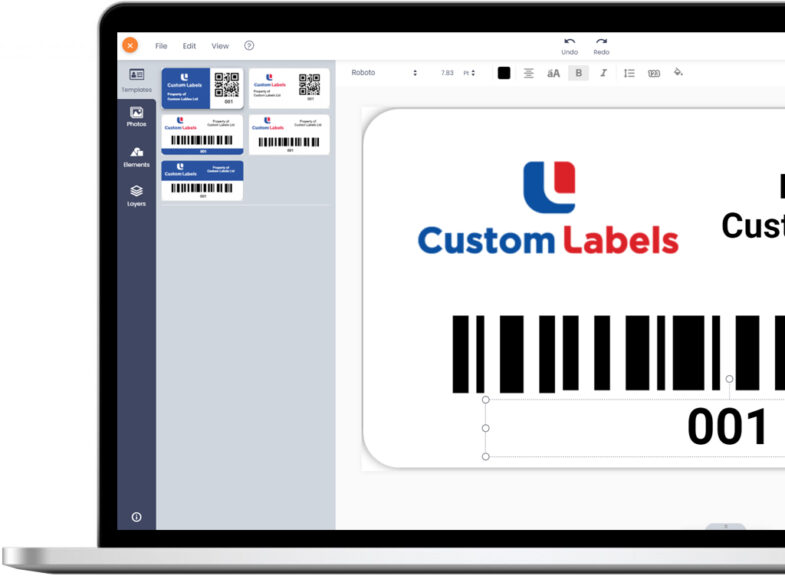
Our Basic & Advanced Designer Tools
Creating your labels is straightforward. Start by selecting your quantity and label size, then choose between the Basic or Advanced Designer tools. Both tools make designing labels simple, but they cater to different needs and levels of customisation.
No matter how you choose to order, our process is built for speed, accuracy, and transparency. After placing your order online or through our sales team, you’ll know exactly what to expect at each stage from confirmation and design approval to invoicing, production, and delivery.
Ordering Online
- Place Your Order – Pick your labels, size, quantity, design your label using our basic or advanced designer tools (see further details below), add to basket and fill out your details in checkout.
- Confirmation Email – We’ll send you an email with all the order details for peace of mind.
- Design Approval – To ensure your design, variable data, and codes are correct, our design team creates a scaled approval form for you to review and approve via the Signable system, which will be sent to you by email.
- Invoice & Production – Once approved, we’ll issue your final invoice and start production.
- Dispatch & Tracking – Your labels are on their way! We’ll email you DPD tracking so you can follow your delivery.
Ordering via Our Sales Team
- Talk to Us – Send us your enquiry and we’ll provide a quote.
- Design Approval – Our design team will prepare a scaled approval form for you, just like online orders.
- Invoice & Production – Approve the design, we issue your invoice, and production begins.
- Dispatch & Tracking – Receive an email with DPD tracking once your labels are dispatched.
However you choose to order, we make sure your labels are accurate, approved, and delivered efficiently.
How do you use the two label designers?
Our website includes two designer tools to suit different workflows and levels of creative control. The Basic Designer guides you through a structured process, ideal if you want to get a label made quickly. The Advanced Designer gives you full layout control, from fonts and colours to element positioning, making it the better choice when brand accuracy or complex layouts matter. Both tools are available directly on the product page once you've selected your size and quantity.
- Basic Designer: Ideal for fast, straightforward label creation.
- Advanced Designer: Offers fuller control over your label layout and branding.
Related Questions:
- What can I do in the Basic Designer? Enter label information, select options like barcodes or QR codes, and upload your logo. Variable data (e.g., serial numbers, asset IDs) can be uploaded via spreadsheet for production.
- What more can I do in the Advanced Designer vs the Basic Designer? Start from a template or from scratch, upload and resize logos, colour match your brand, adjust fonts, and position elements precisely.
- Which one should I choose? Use Basic for speed and simplicity, Advanced for full visual control.
When should I use the basic label designer?
The Basic Designer is perfect when you want a quick, guided approach. You can fill in fields for label information, choose features like barcodes or QR codes, and upload your logo. Variable data can be added via spreadsheet, which our team applies during production to ensure accuracy.
Related Questions:
- Can I upload my own artwork in the Basic Designer? Yes, logos and simple graphics are supported.
- Is it suitable for variable data? Yes, spreadsheets with serial numbers, asset IDs, or sequential numbering are accepted.
When should I use the advanced label designer?
The Advanced Designer is for users who need complete control over their label’s appearance. You can use pre-made label design templates or build designs from scratch, upload logos, colour match, adjust fonts and sizes, and place elements exactly where you want them. While it takes slightly longer than Basic, it offers maximum flexibility. If you do not already have fully specified artwork in mind, we recommend using the Basic Designer.
Related Questions:
- Who should use Advanced Designer? Anyone needing full branding control or complex layouts.
- Can I edit after starting? Yes, you can adjust all design elements until final approval.
uploading, requirements & variable data
Supplying your artwork, branding and variable data
No matter how you choose to order, our process is built for speed, accuracy, and transparency. After placing your order online or through our sales team, you’ll know exactly what to expect at each stage from confirmation and design approval to invoicing, production, and delivery.
Ordering Online
- Place Your Order – Pick your labels, size, quantity, design your label using our basic or advanced designer tools (see further details below), add to basket and fill out your details in checkout.
- Confirmation Email – We’ll send you an email with all the order details for peace of mind.
- Design Approval – To ensure your design, variable data, and codes are correct, our design team creates a scaled approval form for you to review and approve via the Signable system, which will be sent to you by email.
- Invoice & Production – Once approved, we’ll issue your final invoice and start production.
- Dispatch & Tracking – Your labels are on their way! We’ll email you DPD tracking so you can follow your delivery.
Ordering via Our Sales Team
- Talk to Us – Send us your enquiry and we’ll provide a quote.
- Design Approval – Our design team will prepare a scaled approval form for you, just like online orders.
- Invoice & Production – Approve the design, we issue your invoice, and production begins.
- Dispatch & Tracking – Receive an email with DPD tracking once your labels are dispatched.
However you choose to order, we make sure your labels are accurate, approved, and delivered efficiently.
File upload & artwork requirements
To ensure your labels look sharp and print exactly as you want, provide high-quality artwork in the right formats. Our system accepts a range of standard file types (listed below), and following the resolution guidelines helps maintain print clarity and colour accuracy. If your labels include variable data, such as serial numbers, asset IDs, or unique codes, you can also provide spreadsheets or database files to make production seamless.
Related Questions:
- What file types do you accept for artwork? PDF, EPS, AI, and PNG. Vector formats (PDF, EPS, AI) are preferred for crisp lines and text at any size.
- What resolution is needed for logos and images? For raster/pixel images like PNG and JPEG we recommend a minimum of 300 dpi at the final print size.
- Can I upload spreadsheets or database files for variable data? Yes. Our team applies the data accurately during production.
- Can the design team create my label for me? Simple designs are free; more complex artwork may incur a fee.
- Can you help if my files aren’t print-ready? Yes, we can review and adjust files, including resizing, colour matching, and minor edits. Contact our team at 01278 433800 or sales@customlabels.co.uk.
What can I put in a QR code or barcode?
What can I put in a QR code or barcode?
QR codes and barcodes can be linked to almost any information you need — from a simple sequential number to a full online record. Codes can be added using either the Basic or Advanced Designer, and unique or variable data is supplied via spreadsheet, just like other variable fields on your label.
Related Questions:
- What information can a QR code hold? A website URL, GPS/geo-location coordinates, contact details, an online database record, a product or asset page, a video, manual, or instruction document — anything you want a scan to open.
- Can each label have a different, unique QR code or barcode? Yes. Supply your data as a spreadsheet or database file (see "How should I produce and supply my variable data?") and we'll print each label with its own unique code, avoiding duplication.
- Can a QR code link to a database rather than a fixed page? Yes. Many customers link codes to a database record so the destination content (status, service history, location, documents) can be updated without reprinting the label.
- What barcode formats do you support? Code 39, EAN 13, EAN 8, Code 128, Interleaved 2 of 5, Codabar, and EAN 128, covering retail, warehouse, industrial, and government/military use.
- Can QR codes and barcodes be combined with a visual number? Yes. Labels commonly show a human-readable number alongside the scannable code, useful when data needs to be logged manually as well as scanned.
- Are QR codes and barcodes checked for readability before dispatch? Yes. Readability is checked at the proofing stage and again during our QC inspection before every order is dispatched.
For more detail and real-world examples, see our full QR & Barcode Labels guide.
How should I produce and supply my variable data?
Custom Labels can print variable data directly from your supplied spreadsheets or databases, giving you fully personalised labels with visual numbers, QR codes, barcodes, and more. This data can include everything from simple serial numbers to URLs or links to databases for tests, calibration, and service records.
Preparing Your Data
Please note: For quality control purposes, Custom Labels will not manipulate or alter your supplied data. To ensure your labels are printed accurately, please provide your data in the required format. If you’re unsure, feel free to call or email our sales team for guidance.
- Preferred format: We recommend XLSX (Excel) files.
- Values only: Make sure your spreadsheet contains values only — no formulas. This ensures accuracy in printing.
- Raw data only: Please make sure that any hyperlinked or URL data is in its raw form.
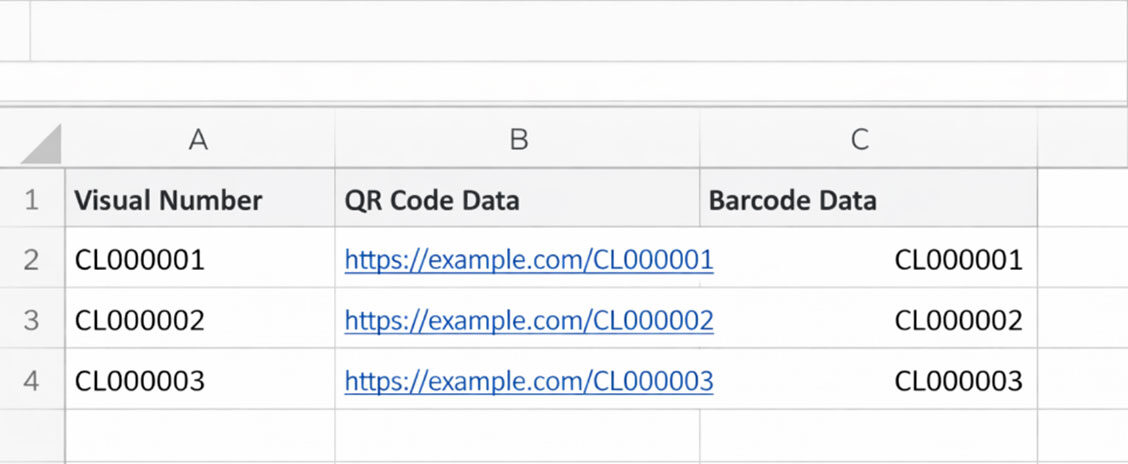
- Organise clearly: Each type of data should have its own column. For example:
- Visual Number: The number that will appear on the label.
- QR Code Data: The information encoded into the QR code (e.g., a URL or assigned number).
- Barcode Data: The number or code that will be represented as a barcode.
Tips for Success
- Check your data: Make sure all entries are correct and final — once printed, labels cannot be altered.
- Keep it simple: One column per variable type makes it easier to map in our system.
- Include all necessary information: Even if some fields are repeated (e.g., the visual number for both visual and barcode), it helps ensure clarity and accuracy.
printing, environments, features, quality control, tracking
All your ordering and order processing queries
No matter how you choose to order, our process is built for speed, accuracy, and transparency. After placing your order online or through our sales team, you’ll know exactly what to expect at each stage from confirmation and design approval to invoicing, production, and delivery.
Ordering Online
- Place Your Order – Pick your labels, size, quantity, design your label using our basic or advanced designer tools (see further details below), add to basket and fill out your details in checkout.
- Confirmation Email – We’ll send you an email with all the order details for peace of mind.
- Design Approval – To ensure your design, variable data, and codes are correct, our design team creates a scaled approval form for you to review and approve via the Signable system, which will be sent to you by email.
- Invoice & Production – Once approved, we’ll issue your final invoice and start production.
- Dispatch & Tracking – Your labels are on their way! We’ll email you DPD tracking so you can follow your delivery.
Ordering via Our Sales Team
- Talk to Us – Send us your enquiry and we’ll provide a quote.
- Design Approval – Our design team will prepare a scaled approval form for you, just like online orders.
- Invoice & Production – Approve the design, we issue your invoice, and production begins.
- Dispatch & Tracking – Receive an email with DPD tracking once your labels are dispatched.
However you choose to order, we make sure your labels are accurate, approved, and delivered efficiently.
How are my labels printed and can you match my colours?
All labels are printed using CMYK (cyan, magenta, yellow, black) to deliver consistent, high-quality results. To achieve the best colour matching, we prefer using Pantone Solid Coated references. These Pantone colours are converted to LAB colour values, which are then used to generate the CMYK print giving a much closer match to your brand colours than a straight CMYK conversion.
Artwork provided in RGB (Red, Green, Blue), CMYK, HEX, RAL, or Pantone formats will be carefully converted or matched by our team to maintain the highest quality and colour accuracy.
We also offer foil printing, noting that:
- The colour range is more limited compared to CMYK
- Complex logos or gradients may not be suitable
- Variable data can be printed, though placement may be slightly restricted
- Our team can advise on the best approach to maintain brand colour accuracy
For advice on colour matching or the best printing method for your labels, contact us at 01278 433800 or sales@customlabels.co.uk.
What information do you need about my label application?
To recommend the correct material, adhesive, finish, and print process, we need to understand how and where your labels will be used. Labels may look similar on screen, but performance can vary significantly depending on the environment and surface they’re applied to.
Providing accurate application details helps us prevent peeling, fading, or premature failure and ensures your labels perform as expected for their intended lifespan.
We use UV-protected inks as standard in our digital printing, but overall durability still depends on the combination of ink, material, adhesive, and environmental exposure. That’s why these details matter.
Related Questions for you to consider and share with us:
Will the label be used indoors or outdoors?
Outdoor labels require UV resistance and weather durability. While our inks are UV-protected, material choice is equally important for long-term performance.
How much UV exposure will it receive?
Direct sunlight or reflected UV (especially on undersurfaces) can accelerate fading and adhesive breakdown.
What temperature range will it experience?
Extreme heat or cold can affect both adhesion and material stability. If possible, provide both application temperature and operating temperature.
What surface will the label be applied to?
- Material (e.g. metal, plastic, powder-coated steel)
- Texture (smooth, textured, rough)
Is the surface flat or curved?
Curved or uneven surfaces may require more flexible materials or stronger adhesives.
Does the label need to be water resistant?
Important for outdoor use, wash-down environments, or high-humidity areas.
Will the label be cleaned regularly or exposed to abrasion?
Cleaning chemicals, pressure washing, or physical wear can impact lifespan.
What is the desired lifespan of the label?
Short-term identification and long-term asset tracking require different specifications.
Gloss or matte finish?
Gloss enhances colour vibrancy and gives a sharper visual finish.
Matte reduces glare, improves barcode scanning under bright light, and helps hide scratches and surface wear better than gloss.
do you have any other label specifications?
Many labels require additional customisation beyond size and material. Providing details upfront ensures your labels perform well and match your requirements.
Related Questions:
- Do you require a specific corner radius?
Rounded corners can improve durability, reduce edge lifting, and help your labels stay securely applied over time. - Do you need custom cut shapes or cut-outs?
Labels can be supplied in unique shapes, with internal cut-outs, or custom outlines to match your branding or asset design. - Do you need perforations or tear-off sections?
Some labels benefit from perforations for easy removal or sequential sections for tracking purposes. - Any special finishes or textures?
Gloss, matte, or textured surfaces can impact readability, scratch resistance, and visual appearance. - Do you need holes or slots for attachment?
Tags or labels that attach with string, cable ties, or rivets may need pre-cut holes or slots. - Other custom requirements?
Let us know any additional features such as embossing, numbering, or special instructions — our team can advise on what’s feasible and durable.
How is my label proofed and approved before printing?
Before printing, every order goes through our in-house approval process. We create a visual, scaled proof showing exactly how your label will look.
Checks include:
- Minimum font sizes and barcode/QR code readability
- Colour references converted to CMYK and referenced in Pantone Solid Coated
- Artwork quality and variable data reviewed
- Any issues flagged
Labels are only printed after you approve the final design.
How will my labels be supplied?
Labels can be supplied in formats to suit your workflow:
- On rolls: Ideal for automated dispensers or hand application
- Individual A4 sheets
- Pre-cut shapes: Custom shapes to help with application
We’ll help you choose the best format for your needs.
Can I track my order?
You’ll always know when your labels are being processed and when they’re on the way. If you place an order through our website, you’ll receive email updates when your order is confirmed and again when it has been dispatched. For direct orders via our sales team, they will keep you informed of any issues, additional requirements, and confirm when your labels have been sent. Once dispatched, all customers receive tracking information from our courier, DPD, so you can see your delivery status.
Related Questions:
- How will I get updates?
Web orders: email confirmations at order acceptance and dispatch
Direct orders: updates from our sales team plus DPD tracking email - Can I change my shipping details after ordering?
Contact our sales or support team as soon as possible, and we’ll advise on what can be adjusted before dispatch - Will I know if there’s a delay or issue?
Yes. Our team will notify you promptly if any issues arise during production or before dispatch
How do your qc checks differ from others?
Quality control is central to everything we do at Custom Labels. Every label is inspected before dispatch to ensure it meets our high standards and will perform reliably in the field. This process covers all aspects of the label, from print quality to adhesion and variable data accuracy. Any label that doesn’t meet our criteria is immediately remade, so you can be confident in the consistency and reliability of your order.
Key Points / Mini Questions:
- What do you check? Variable data accuracy, barcode and QR code readability, print quality, and adhesion
- What happens if a label fails inspection? It is remade immediately to maintain quality standards
- Why does this matter? Ensures your labels are accurate, durable, and ready for use without risk of errors
paying, returns, support and contact
No matter how you choose to order, our process is built for speed, accuracy, and transparency. After placing your order online or through our sales team, you’ll know exactly what to expect at each stage from confirmation and design approval to invoicing, production, and delivery.
Ordering Online
- Place Your Order – Pick your labels, size, quantity, design your label using our basic or advanced designer tools (see further details below), add to basket and fill out your details in checkout.
- Confirmation Email – We’ll send you an email with all the order details for peace of mind.
- Design Approval – To ensure your design, variable data, and codes are correct, our design team creates a scaled approval form for you to review and approve via the Signable system, which will be sent to you by email.
- Invoice & Production – Once approved, we’ll issue your final invoice and start production.
- Dispatch & Tracking – Your labels are on their way! We’ll email you DPD tracking so you can follow your delivery.
Ordering via Our Sales Team
- Talk to Us – Send us your enquiry and we’ll provide a quote.
- Design Approval – Our design team will prepare a scaled approval form for you, just like online orders.
- Invoice & Production – Approve the design, we issue your invoice, and production begins.
- Dispatch & Tracking – Receive an email with DPD tracking once your labels are dispatched.
However you choose to order, we make sure your labels are accurate, approved, and delivered efficiently.
How do I pay?
We make payment simple and flexible to suit different customers and order types. Whether you are placing a small web order or arranging a bulk purchase through our sales team, there are multiple ways to pay.
Related Questions:
- Which payment methods are accepted? Credit or debit card, bank transfer, and purchase orders for businesses or institutions.
- When do I select a payment method? During checkout for web orders, or directly with our sales team for bulk orders
- Can I arrange alternative payment options? Our team can advise for special cases or large projects
Returns, cancellations, and refunds
We want every order to meet your expectations. If you notice a defect, damage, or mistake with your labels, it’s important to let us know promptly so we can resolve it efficiently and get you the correct labels.
Related Questions:
- How do I notify you of an issue with my order? Contact our sales team as soon as possible via email at sales@customlabels.co.uk, by phone on 01278 433800, or through our Pure Chat service on the website.
- What information should I provide? To help us resolve the issue quickly, include:
- Your order number
- A clear description of the problem
- A photo or scan showing the defect, damage, or printing error
- Can I cancel an order or request changes? Orders cannot be cancelled once they have been processed (after official order confirmation has been sent or upfront payment has been made) due to the customised nature of our labels and the material orders made specifically for your job. Please check your order carefully before confirming.
- What happens after I report a problem? Our team will review the issue and respond with the next steps. Depending on the situation, we may replace the labels, issue a refund, or offer a partial credit for affected items.
- How quickly will my issue be resolved? We aim to respond to all queries as soon as possible and guide you through the resolution efficiently, keeping you updated at every step.
Support & Contact
Our website is designed for easy label selection. You can quickly find the products, guides, and support you need without guesswork.
- Browse Products: Select “Shop” in the top menu. On the shop page, a sidebar with Product Categories, Industries, Sectors & Environment, and Information lets you filter products by type, application, or environment.
- Expert Guides: Select “Our Labels” in the top menu, then click “Expert Guide to Asset Labels & Tags” for advice on choosing the right label.
- Sample Requests: Click the “Custom Sample Pack” or “Standard Sample Pack” button at the top of any page to order free samples.
- Returning Customers: Visit the Returning Customer page (under “Contact → Returning Customers”) to access previous orders, request design changes, or reorder labels.
- Support: Click “Contact” in the top menu or use Pure Chat to speak with our team in real time.
Clear menus and search functions make finding the label you need quick and simple.